
Summary
-
What you'll do: Delete a client, or a whole household, from Timeline.
-
It's permanent: Removing a client deletes all their data, and it can't be restored.
-
Households go together: Removing a household from the client's page deletes the main client, their partner and any children.
-
Timeline Platform clients: They can't be removed here. Contact platform@timeline.co.
Description
Before you start
Download anything you need to keep, such as reports or FactFinds, from the client's documents first. If you want to tidy up a duplicate rather than lose the data, merge the clients instead.
1. Remove the client
-
Open the client from "Clients".
-
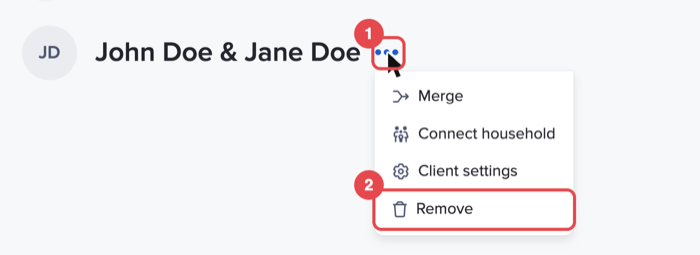
Click "…" next to the client's name, then "Remove".
-
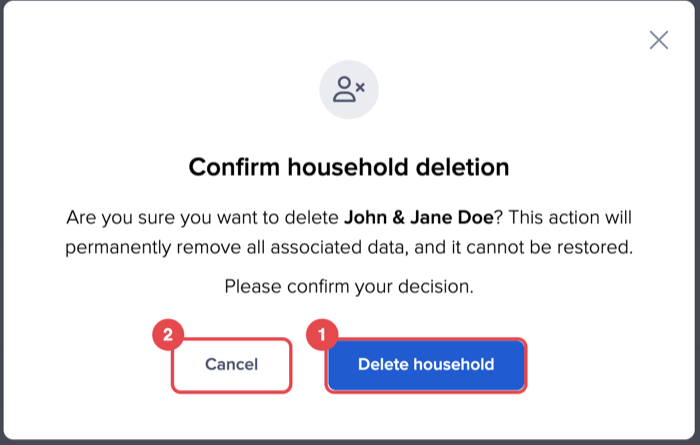
A confirmation window opens: "Confirm client deletion" for a single client, or "Confirm household deletion" for a couple. It names who will be deleted and warns that all associated data will be removed permanently.
-
Click "Delete household" (or "Delete Client") to remove them, or "Cancel" to keep them.
2. Clients on Timeline Platform
If the client is being onboarded to, or already has accounts on, Timeline Platform, Timeline shows "We can't delete this client" instead. Contact platform@timeline.co if you need the client removed.
Conclusion
Removing clients you no longer advise keeps your client list and exports accurate. Because it can't be undone, check the name in the confirmation window before you click. Next, read FAQs: managing clients.