
Summary
-
Two parts to the model cost: Timeline's DFM fee for managing the model, plus the ongoing charges (OCF) of the funds inside it.
-
The DFM fee is set in your firm's agreement: in Timeline you can set it to 0.09%, 0.12% or 0.15% a year to match.
-
The OCF is a weighted average: each model's OCF is the OCF of each fund weighted by how much of the model it makes up. You'll find it in the "Models" tab.
-
Transaction costs are shown too: each model's weighted transaction cost sits next to its OCF.
-
Not included: your platform's charges and your own advice fee. Add those separately when you show your client the total.
Description
1. What makes up the cost of a model
-
DFM fee: the fee Timeline charges for its discretionary fund management service, the ongoing management of the model on your client's behalf. It's an annual percentage of the amount invested, and the rate depends on your firm's agreement with Timeline.
-
OCF (ongoing charges figure): the total annual cost of running the individual funds within the model, including each fund's annual management charge and other operating expenses. It's taken inside the funds, so it shows up in fund prices rather than as a separate charge.
-
Transaction costs: the costs the funds incur when they buy and sell investments, reported after the event (ex-post).
So the model's own annual cost is: DFM fee + weighted OCF + weighted transaction costs. Your client's total cost also includes the platform charge and your adviser charge.
2. Find a model's OCF and transaction cost
-
Click "Models" in the top navigation.
-
On the "Portfolios" tab, choose the range you want.

-
Read "Portfolio OCF (Weighted)" and "Transaction Cost (Weighted)" for each model.
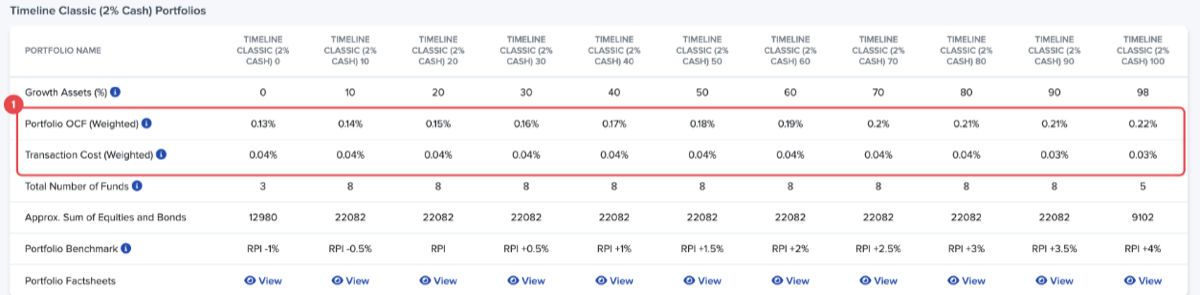
For fund-by-fund detail, open the "Funds" tab. It lists each fund's "OCF" and "Transaction Costs (Ex-Post)", with its factsheet and KIID.
3. Show the DFM fee in performance figures
Timeline can show model performance before or after the DFM fee:
-
On the "Performance" tab, turn on "Net of DFM Fees" to see figures after the fee.
-
To use your firm's rate, go to your account settings, open "Real Return Customisation" and choose "DFM Fee (annual)": 0.09%, 0.12% or 0.15%. The same settings hold your "Adviser Fee (annual)" and "Platform Fee (annual)", which Timeline deducts in Analytics to show net returns.
4. Worked example
Your client invests £300,000 in a model with a weighted OCF of 0.15% and a weighted transaction cost of 0.05%, and your firm's DFM fee is 0.12%. The model's annual cost is 0.15% + 0.05% + 0.12% = 0.32%, about £960 a year at that value. Platform and advice charges come on top. These figures are an illustration only. Use the figures on the "Portfolios" tab for the model you recommend.
Conclusion
Every part of a model's cost is in the "Models" tab, so you can give your client one clear annual figure and show where each part comes from.
For a related question about entering fund charges in a financial plan, see Ongoing Charges Figure (OCF). Next, read the FAQs: Model Portfolios.