IFA WEBINARS

Learn more about Timeline - free upcoming online demos

Book now

Planning

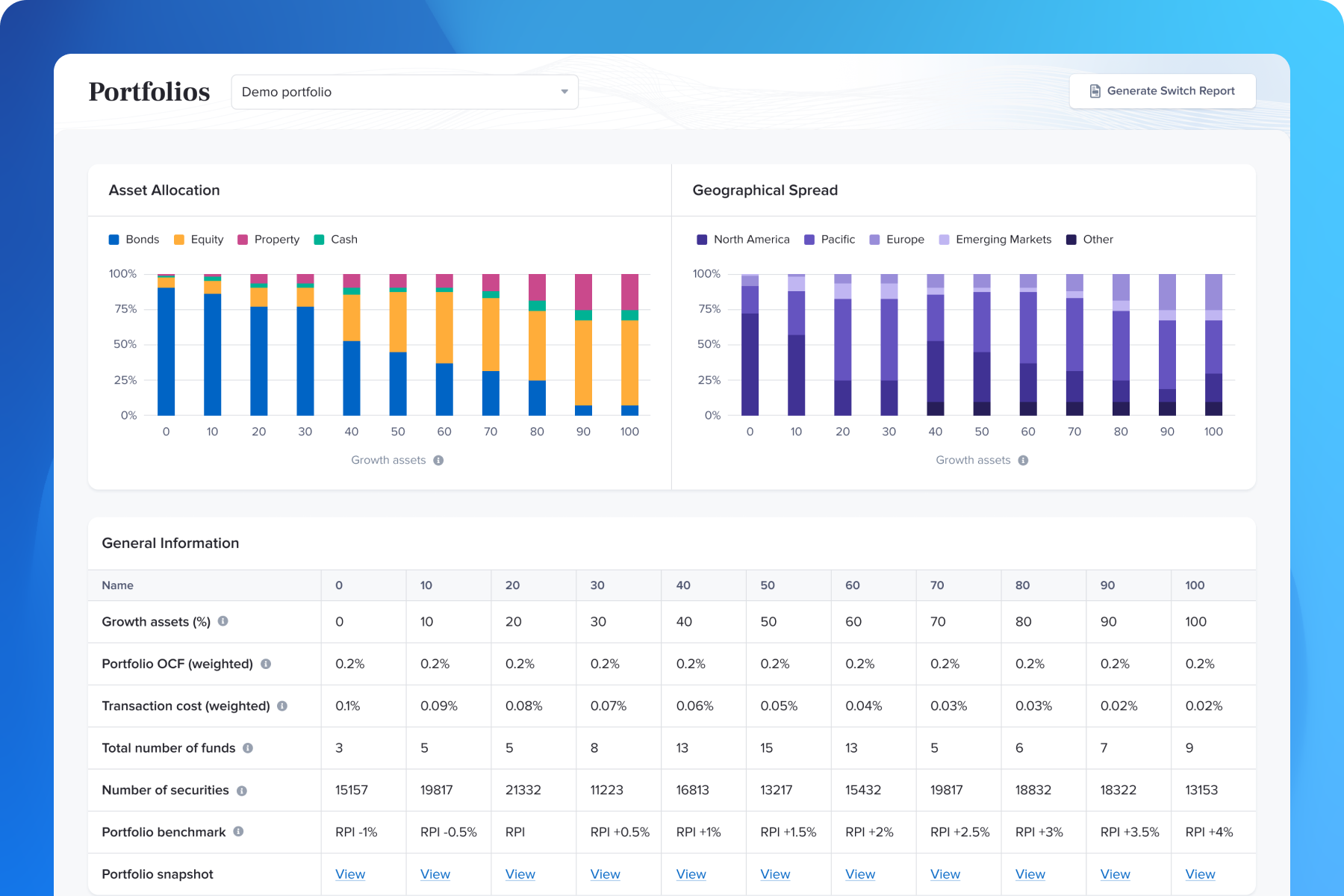
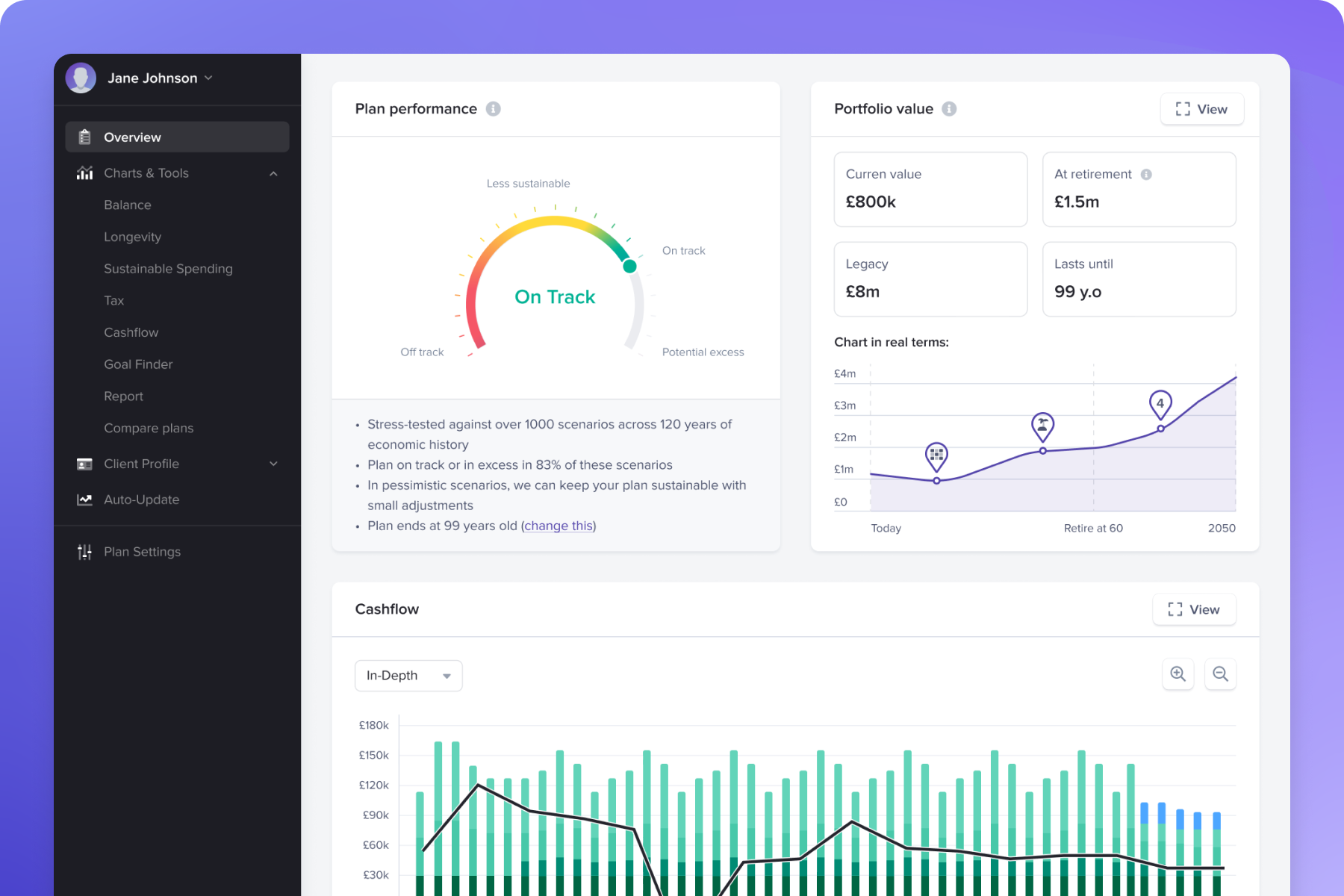
Compare plans, stress test against 100-years' capital markets data - all in a highly visual way that brings it to life for clients.

Portfolios

Seamlessly map the appetite for risk to one of our evidence-based model portfolios and manage investments easily via our Control Centre.
FOR FINANCIAL ADVISERS ONLY

With Timeline

Collect Client
Data in Minutes

With Timeline FactFind, client data is collected quickly and seamlessly. What once took days now takes minutes.
 
Our adviser ecosystem enhances efficiency and client satisfaction with a fully customisable, automated FactFind.
 
Exclusively for UK Financial Advisers
Planning-1
Portfolios

Planning

Compare plans and stress test against 100years' capital markets data in a highly visual way that brings it to life for your clients. 

Enquire Today

Portfolios

Seamlessly map the appetite for risk to one of our evidence-based model portfolios and manage investments easily via our Control Centre.

Enquire Today

Exclusive to financial advisers

We make financial planning easier for advisers and more engaging for clients. Financial Advisers add the most value to clients through personalised plans and coaching that gives clients clarity and confidence in their financial future.  Hear the direct feedback from advisers and firms who have reaped the benefits of working with us. 


Exclusive to financial advisers

We make financial planning easier for advisers and more engaging for clients. Financial Advisers add the most value to clients through personalised plans and coaching that gives clients clarity and confidence in their financial future.  Hear the direct feedback from advisers and firms who have reaped the benefits of working with us. 

Smarter, Faster Client Data Collection.

FactFind empowers you to take control of data collection, allowing you to complete the FactFind yourself for faster, more efficient client onboarding.

  • Shareable Client Links – Clients can securely complete their details remotely, streamlining onboarding.

  • Prefilled Custom Data Fields – Preload information so clients only confirm or update what’s changed.

  • Automated Reminders – Notifications run themselves, keeping clients on track without chasing.
Factfind-R5

Features That Will Optimise Productivity

While other tools offer forms, Timeline FactFind delivers flow. It's built to remove duplication, reduce delays, and ensure accuracy at every step.

classic-1

Seamless Data Entry

Accounts, savings, properties, and mortgages flow automatically into financial plans.

estate

Summary Figures at a Glance

Totals for income, expenses, debts, and assets instantly visualised for clearer conversations.

iht

Drag-and-Drop Workflow Customisation

Tailor FactFind steps to suit each client (no coding required).

distribution

Customised, Reusable Templates

Duplicate, edit, and manage templates, while archiving outdated ones to keep things clean.


See FactFind in Action

Want to see how it all comes together?

Watch our How Does It Work video to explore the FactFind experience from both the adviser and client perspectives.

Build FactFinds Your Way.

Create reusable templates, add custom questions and fields, and turn sections on or off for each client. Send prefilled FactFinds where every answer flows across the financial plan, Letters of Authority, reports, and the platform with no rekeying needed.

The result is simple. You capture the right facts once, reduce errors and meeting time, and spend more time on what really matters: understanding what the client wants and turning it into clear, personalised advice.


Factfind-R6
Success-tour-text-PLAIN-COM-ezgif.com-gif-maker


This online tour will show you all the features and benefits of Timeline's unified eco-system for financial planners.

Book A Tour

Read About Our Product Updates

More Flexibility on Timeline Platform: New Household Settings and Team Permissions
Articles & Blogs
2 min read

More Flexibility on Timeline Platform: New Household Settings and Team Permissions

Discover new Timeline Platform household settings and team permissions, giving financial advisers more flexibility over client visibility and team access.
Ask Pennee to compare it: Analytics, now in the conversation
Articles & Blogs
1 min read

Ask Pennee to compare it: Analytics, now in the conversation

Use Pennee to request Timeline Analytics comparisons in natural language. See how Pennee Analytics works and how to start using the beta feature.
Import client data from almost any spreadsheet with Pennee
Articles & Blogs
1 min read

Import client data from almost any spreadsheet with Pennee

Streamline client data imports with Pennee's Universal Spreadsheet Importer, designed to simplify onboarding and enhance efficiency for financial advisers.

Ready to give it a try?

Focus more on advice, less on admin.

Timeline FactFind is built to help you work smarter: flexible data capture, seamless integrations, and a client-friendly experience that frees you from repetitive tasks.

Try full functionality for just £1 for the first 30 days. Thereafter, the cost is only £135 + VAT per month / £33.75 + VAT per week, including unlimited clients. Cancel anytime.

Read About Our Product Updates

More Flexibility on Timeline Platform: New Household Settings and Team Permissions
Articles & Blogs
2 min read

More Flexibility on Timeline Platform: New Household Settings and Team Permissions

More flexibility for your clients. More flexibility for your team. We've made two updates to Timeline Platform, giving you more flexibility over your clients' experience and how your team works on the Platform. There are new role-based Platform permissions for your team, alongside new options for tailoring account visibility across households. New on Timeline Platform More flexibility, built into the Platform. Tailor Platform access and household visibility to suit your clients and your team. Platform permissions Set the right level of Platform access for your team Different members of your team may have different responsibilities, from preparing documents and supporting onboarding through to managing transactions. Role-based permissions make it easier to tailor Timeline Platform access around those responsibilities. Four levels of access Match Platform access to different responsibilities None No access to Timeline Platform. Document producer Can take a client through onboarding up to the illustrations page, and download client-level or firm-level reports for Platform clients. Application submitter Can complete onboarding, including bank details, KYC/AML and sending the client invitation. Full Platform access Access to everything currently available on Timeline Platform, including deposits, transfers, withdrawals, buys and sells. How do Timeline Platform permissions work? When you select a role, you'll see the full list of actions included, making it easier to understand the level of access assigned to each team member. ✓ Choose from four role-based levels of Platform access ✓ See which actions are included within each role ✓ Restricted actions are greyed out and restricted pages are blocked if accessed directly by URL Only users with the 'Can manage team and permissions' permission can make changes to these settings. See it in action Take a closer look at Platform Permissions. Watch the short walkthrough → Household settings Tailor the Platform experience for each household Every household works a little differently. Some clients manage their finances closely together, while others prefer to keep certain accounts separate. Household settings give you the flexibility to tailor what each household member sees on Timeline Platform. 1 Personal view The client sees only their own accounts, transactions and documents. 2 Household view The client can see accounts, transactions and documents across the whole household. Where to find it Open the '...' menu next to the household name and select 'Client settings'. Household settings are available for clients onboarded on Timeline Platform. More flexibility, built into Timeline Platform Whether you're tailoring what individual household members see or matching Platform access to responsibilities across your team, both updates give you more flexibility in how your firm uses Timeline Platform. Both updates are live now. If you have any further questions, we're always happy to help. Please get in touch at support@timeline.co. Take a look on Timeline Platform Log in to explore the new Platform permissions and household settings. Log in to Timeline Platform Not yet using Timeline Platform? Speak to your AST, or find out more on our website.
Ask Pennee to compare it: Analytics, now in the conversation
Articles & Blogs
1 min read

Ask Pennee to compare it: Analytics, now in the conversation

There's a quicker way to get to the comparisons you need in Timeline Analytics. Pennee is Timeline's AI assistant. With Pennee Analytics*, you can now ask it for the comparison you need, and it will pull up the Timeline Analytics chart, right there in the conversation. No separate Analytics journey. Just tell Pennee what you want to compare. Pennee Analytics Ask Pennee to compare it.* Same chart, same data, just faster to reach. Illustrative working example only. Sarah Patel is a fictional client, and the chart does not show real client data or performance figures. For example "Compare [client name] against Timeline Classic 100." Timeline Classic 100 is shown as an example. Add the portfolio or benchmark relevant to your comparison. How it works How does Pennee Analytics work? 1 Ask for the comparison Tell Pennee which client you're working with and the portfolio or benchmark you'd like to compare. 2 Pennee uses Timeline Analytics Pennee passes the request to Timeline's existing Analytics functionality. 3 Get the chart in the conversation The resulting Analytics chart is returned within the Pennee chat, so you can continue from where you were. Same chart. Same data. Just faster to reach. Does Pennee perform the investment analysis? No. Pennee doesn't perform a separate investment analysis. When you ask Pennee for a comparison, it uses Timeline's existing Analytics functionality to generate the chart. Pennee does not create its own calculation or performance figures. ✓ Existing Timeline Analytics functionality ✓ Existing underlying data and methodology ✓ A quicker route to the Analytics chart When might you use Pennee Analytics? You might be preparing for a client meeting, reviewing a client's investments, or need to compare a client portfolio against another portfolio or benchmark. Instead of navigating away to set up the comparison separately in Analytics, you can ask Pennee and get the resulting chart back in the conversation. Ask Pennee to compare it.* Same chart, same data, just faster to reach. Log in to your Timeline account to start using Pennee. Log in to Timeline *Beta: Pennee Analytics is currently in beta. Beta functionality may change as we continue to develop and refine the experience.
Import client data from almost any spreadsheet with Pennee
Articles & Blogs
1 min read

Import client data from almost any spreadsheet with Pennee

Timeline investing and platform services are provided by Timeline Portfolios Limited (No. 11557205), which is authorised and regulated by the Financial Conduct Authority (FRN: 840807). Timeline planning software and tools are provided by Timelineapp Tech Limited (No. 11405676) and are not regulated by the Financial Conduct Authority. Both companies are registered in England and Wales with their registered office at 70 Gracechurch Street, London, EC3V 0HR.

Past performance is no guarantee of future return. The value of investments and the income from them can go down as well as up. You may get back less than you invest. Transaction costs, taxes and inflation reduce investment returns.