
Preparing one annual review report takes 4.8 staff hours before the client meeting even starts. Charts are screenshotted from one system, numbers pasted from a spreadsheet and the story typed into Word. In our Timeline Edge webinar, Revolutionary Reporting, Gonzalo Podgaezky, Product Manager at Timeline, showed UK financial advisers how Modular Reporting turns that process into minutes rather than hours.
Here is how to build client reports that tell the story behind your advice, support Consumer Duty and still look and sound like your firm.
Why client reports take hours
For most advice firms, client data is spread across several systems: cashflow, risk profiling, investment analysis, the platform and the fact find. The annual review report is where all of it has to come together, and that usually means manual work. When figures are copied between documents, numbers may not reconcile, human error creeps in and the formatting, checking and rework add hours to every review.
The report is now where advisers show their value
Three years into Consumer Duty, clients understanding their advice is the standard. At the same time, AI note takers have added another tool to the tech stack. They hold useful information, but it sits outside an adviser's main systems and still has to flow into the report, the platform and the cashflow plan. 70% of firms changed their tech stack last year, yet few feel it joins up.
At firms with 6 to 50 advisers, preparing the report is the longest step of the review (42%). That makes reporting one of the clearest places to win back time.
"Your report is a view of your client record, not a copy of it."
Gonzalo Podgaezky, Product Manager, Timeline
That is the idea behind Modular Reporting. The client data, cashflow plan, risk profile, portfolio, investment analysis and FactFind already live in Timeline. The report reads from them, so there is nothing to paste.
Build templates that fit your firm
Firms can build as many report templates as they need, with no limit and no cap. Timeline's default templates sit beside the ones your firm builds, so you can use them as they are, duplicate and adapt them, or start from scratch.
Sections that pull from the whole client record
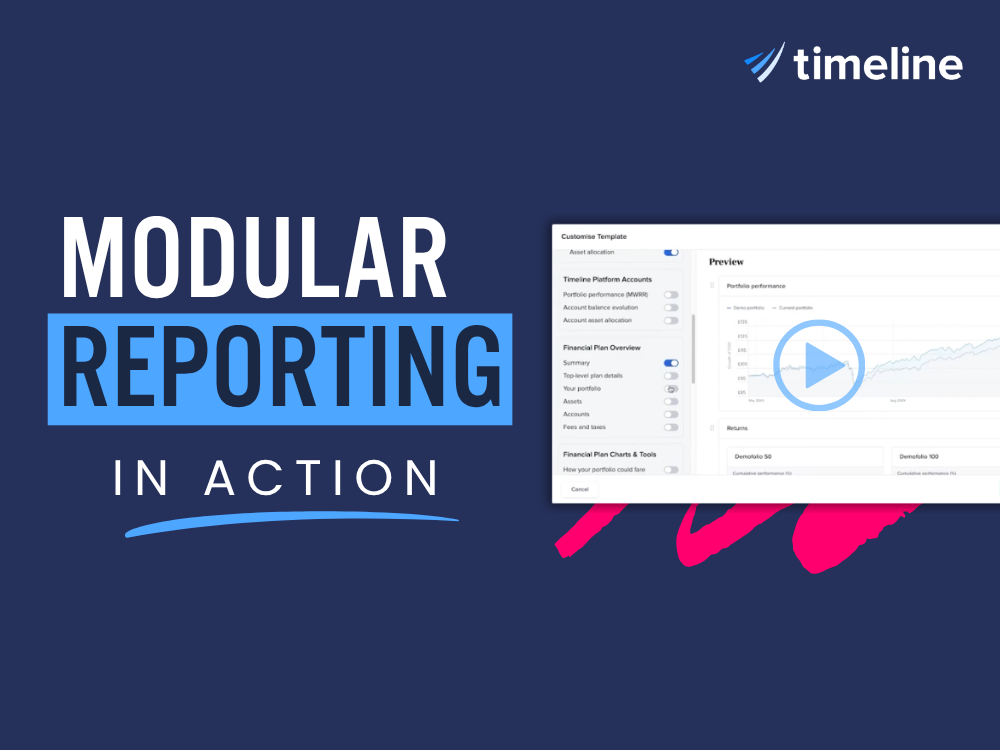
Each template is built from sections you toggle on and off, then drag and drop into the order you want. Because every section reads from the same client record, the plan, the risk profile and the portfolio sit side by side, and the client sees the thinking behind your advice rather than two versions of the truth.
- Timeline Portfolios: reasons to switch, investment philosophy and risk tolerance.
- Investment analysis: portfolio performance, returns, geographical diversification and equity sector allocation, including side by side portfolio comparisons.
- Platform data: client performance and account balance evolution, if you use the Timeline platform.
- Cashflow and financial planning: plan success rate, plan level details such as spending goals and income sources, stress testing, the cashflow chart and comparisons between plans, such as a long term care scenario.
- IHT planner, risk profile and FactFind: the risk score and how it was calculated, plus income sources, property and financial goals captured in the fact find.
- Legal, signature and client comments: including a signature page, new this year.
Client education sections for Consumer Duty
Consumer Duty asks for understanding, not more pages. A client who has seen the bad years on paper is ready when one arrives. New this year, client education sections let you pick only the ones that suit each client, set the values for each report and add your own words.
Growth of wealth, best and worst years, and returns over inflation are also available. Some sections use static data, while others, such as the highs and lows chart, are tailored to the client's portfolio.
Custom sections and dynamic fields
You can add your own custom sections, such as a welcome letter or a year in review, with formatted text, images and links. Within them, dynamic fields work much like merge fields in an email. Drop in the client's name, retirement age, property values, mortgage details or risk score, and each report fills them in from the client record. More dynamic fields are being added.
"I put together an annual review template in about five minutes."
Small IFA, 2025
Personalising an annual review report
The firm template sets the structure that any adviser in the firm can use. Personalisation happens when you generate the report for a particular client. Gonzalo built an annual review live, and the process takes you step by step through each section in the template.
Risk profile. If a client has completed several risk questionnaires over the years, choose which one to use and whether to include capacity for loss.
Accounts and portfolios. Pick the accounts to include, such as a GIA and ISA but not a pension, and compare current portfolios against alternatives.
Costs and charges. Enter platform, adviser service and other fees, plus the cost of other investments, to compare costs across portfolios. Then set the time frame for the performance chart.
Client education. Choose the accounts, balance and time periods to show.
Financial plan. Pick the plan, the historical scenarios and any what if scenarios to compare, such as the original plan against an optimised one, all exported into a single report.
Final sections. Remove anything that is not relevant for this client, such as portfolio performance, and add it back at any time.
Timeline then pulls the data from each tool, along with the template's images and wording, and puts everything together into a single branded report with your firm's logo. Sections with no data drop out on their own.
Reports that sound like you
Clients trust you, not your software, and a generic pack reads like it came from a machine. In the editor, you can add your own text to any section, insert images and page breaks, and everything saves automatically.
Pennee rewrites, you approve
Pennee, Timeline's AI agent, sits inside the editor. Highlight any text and ask Pennee to summarise it, clarify it or follow your own instruction. In the demo, Gonzalo highlighted a client education section on bonds and equities and asked Pennee to clarify it for a 70 year old client, tailoring the explanation to that person.
Pennee shows the original text next to the suggested replacement, and nothing changes until you accept it, so the adviser stays in control of every line. Because Pennee has access to the client's data and your firm's data in Timeline, its edits are based on real figures.
"It doesn't make up any number."
Gonzalo Podgaezky, Product Manager, Timeline
Pennee also has memory. Tell it your tone of voice, for example that you write in a very friendly style, and it will remember that for future edits.
Save, refresh and send securely
If you cannot finish a report in one go, save it and return to it later from the client's documents. Before sending, Gonzalo recommends refreshing the data, so that any changes since you started, perhaps a week ago, are pulled through. You can then download the report as a PDF or send it securely through Timeline's client portal, with your own subject line and message.
Questions from advisers
Does it work if we use third party cashflow, risk or fact find tools?
Yes. The more Timeline tools you use, the easier it is for the report to pull data, and Timeline is expanding its integrations. If you use another cashflow tool, export a PDF or CSV and upload it to Pennee, which will extract the relevant data and insert it into the report. The same works for letters of authority, valuations and other client documents.
Can we save our compliance wording and disclaimers as reusable sections?
Yes. Add your compliance wording as a custom section in the template and everyone in the firm can reuse it, with the option to tailor it during personalisation. Timeline is also planning to add compliance and Consumer Duty sections with suggested wording.
Does it work for couples?
Yes. Reports can include both partners, and if the financial plan covers both, it will show their income sources, expenditure and accounts.
Can we leave out accounts that are not part of the review?
Yes. You select which accounts go into each report, so an old workplace pension you do not look after can stay in the client record but out of the report.
If we move to Timeline, how much data do we need before our first report?
There are three routes. You can upload two or three documents for a client to Pennee, which will add the information to the client record and can create households. You can import in bulk through integrations, such as Intelliflo, or platform APIs. Or you can enter data manually, which Timeline no longer recommends. If you upload a fact find from another provider, Pennee adds the information to the client record rather than creating a new Timeline fact find.
How does the Intelliflo integration work?
Client details such as name, date of birth and address come from Intelliflo. For investment account data, such as balances, valuations and portfolios, Timeline connects directly with the platform, which is more reliable than relying on a back office system's own platform feeds.
Want to see Modular Reporting with your own templates and clients? Book a walkthrough or speak to your regional rep for a personalised demo.
Sources and notes: Annual review preparation time, Consumer Duty, AI adoption, tech confidence and report preparation statistics: NextWealth, Financial Advice Business Benchmarks 2025 (263 firms). Adviser quotes are from Timeline customer feedback. Product features shown as demonstrated on 21 October 2026.

.png)